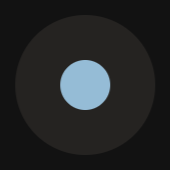
之前看到有網站的游標長得像這樣,就一直很想用。這次花了些時間研究給弄好了。
游標

這個原理其實很簡單,用兩個 div,border-radius: 50%; 呈現圓形。CSS 套用樣式,JavaScript 讓他跟隨滑鼠就完成。

在程式和樣式部分我參考了這個:

See the Pen Circle Follow Cursor by Hakadao (@Hakadao) on CodePen.

這是我修改後的程式與樣式,讓他更搭配我的主題,也另外增加了一些顏色與形狀的變化:

1
2
3
4
5
6
7
8
9
10
11
12
13
14
15
16
17
18
19
20
21
22
23
24
25
26
27
28
29
30
31
32
33
34
35
36
37
38
39
40
41
42
43
44
45
46
47
48
49
50
51
52
53
54
55
56
57
58
59
60
61
62
63
64
65
66
67
68
69
70
71
72
function getElementsWithTextNoLinksOrButtons() {
return [...document.querySelectorAll("*")].filter(el =>
el.textContent.trim() !== "" &&
!el.closest("a") &&
!el.closest("button") &&
!el.querySelector("a") &&
!el.querySelector("button") &&
el.nodeType === Node.ELEMENT_NODE
);
}

const cursor = document.querySelector("#cursor");
const cursorBorder = document.querySelector("#cursor-border");
const linksAndButtons = document.querySelectorAll("a, button");
const texts = getElementsWithTextNoLinksOrButtons();
const cursorPos = { x: 0, y: 0 };
const cursorBorderPos = { x: 0, y: 0 };

cursor.style.setProperty("--width", "10px");
cursor.style.setProperty("--height", "10px");

document.addEventListener("mousemove", (e) => {
cursorPos.x = e.clientX;
cursorPos.y = e.clientY;

cursor.style.transform = `translate(${e.clientX}px, ${e.clientY}px)`;
});

document.addEventListener("mousedown", (e) => {
cursor.style.setProperty("--width", `${cursor.style.getPropertyValue("--width").replace("px", "") * 1.8}px`);
cursor.style.setProperty("--height", `${cursor.style.getPropertyValue("--height").replace("px", "") * 1.8}px`);
});

document.addEventListener("mouseup", (e) => {
cursor.style.setProperty("--width", `${cursor.style.getPropertyValue("--width").replace("px", "") / 1.8}px`);
cursor.style.setProperty("--height", `${cursor.style.getPropertyValue("--height").replace("px", "") / 1.8}px`);
});

texts.forEach((text) => {
text.addEventListener("mouseover", (e) => {
cursor.style.borderRadius = "0%";
cursor.style.setProperty("--width", "2px");
cursor.style.setProperty("--height", "20px");
});
text.addEventListener("mouseout", (e) => {
cursor.style.borderRadius = "50%";
cursor.style.setProperty("--width", "10px");
cursor.style.setProperty("--height", "10px");


});
});

linksAndButtons.forEach((linkAndButton) => {
linkAndButton.addEventListener("mouseover", (e) => {
cursor.style.backgroundColor = "#daaf61";
cursorBorder.style.setProperty("--size", "50px");
});
linkAndButton.addEventListener("mouseout", (e) => {
cursor.style.backgroundColor = "#95bcd6";
cursorBorder.style.setProperty("--size", "28px");
});
});

requestAnimationFrame(function loop() {
const easting = 8;
cursorBorderPos.x += (cursorPos.x - cursorBorderPos.x) / easting;
cursorBorderPos.y += (cursorPos.y - cursorBorderPos.y) / easting;

cursorBorder.style.transform = `translate(${cursorBorderPos.x}px, ${cursorBorderPos.y}px)`;
requestAnimationFrame(loop);
});
1
2
3
4
5
6
7
8
9
10
11
12
13
14
15
16
17
18
19
20
21
22
23
24
25
26
27
28
29
30
31
32
33
34
35
36
* {
cursor: none;
}

/* 這段是專門對 butterfly 的,其他主題可能要自行修改 */
.search-dialog, .fancybox__container {
*{cursor: auto;}
}

#cursor {
position: fixed;
top: calc(var(--height) / -2);
left: calc(var(--width) / -2);
width: var(--width);
height: var(--height);
background-color: #95bcd6;
transition: top 0.15s ease-out, left 0.15s ease-out, width 0.15s ease-out, height 0.15s ease-out, background-color 0.15s ease-out;
border-radius: 50%;
pointer-events: none;
z-index: 999;
}

#cursor-border {
--size: 28px;
position: fixed;
top: calc(var(--size) / -2);
left: calc(var(--size) / -2);
width: var(--size);
height: var(--size);
border-radius: 50%;
background-color: #5c565156;
mix-blend-mode: difference;
pointer-events: none;
transition: top 0.15s ease-out, left 0.15s ease-out, width 0.15s ease-out, height 0.15s ease-out, background-color 0.15s ease-out;
z-index: 999;
}

把以上兩個檔案存在 source 資料夾下,並且在設定文件中的 Inject 加入下面這行就可以,記得路徑要填對。

1
<div id="cursor-border"></div><div id="cursor"></div><link rel="stylesheet" href="/css/custom_cursor.css"><script src="/js/custom_cursor.js"></script>

當然其他不是 butterfly,而是其他網站或主題也可以用。

q(≧▽≦q)

20250707 更新

因為有人說我的網站太卡,所以我先把這個下架了。
(;´д`)ゞ

20260225 更新

Vibe Coding 一下,請 AI 改善效能問題。不知道 AI 改的有沒有效,把程式放在下面並且重新使用游標。

1
2
3
4
5
6
7
8
9
10
11
12
13
14
15
16
17
18
19
20
21
22
23
24
25
26
27
28
29
30
31
32
33
34
35
36
37
38
39
40
41
42
43
44
45
46
47
48
49
50
51
52
53
54
55
56
57
58
59
60
61
62
63
64
65
66
67
68
69
70
71
72
73
74
75
76
77
78
79
80
81
82
83
84
85
86
87
88
89
90
91
92
93
94
95
96
97
98
99
100
101
102
103
104
105
106
107
108
109
110
111
112
// ===== Cursor Elements =====
const cursor = document.querySelector("#cursor");
const cursorBorder = document.querySelector("#cursor-border");

if (!cursor || !cursorBorder) {
console.warn("Custom cursor elements not found.");
}

// ===== State =====
const cursorPos = { x: 0, y: 0 };
const cursorBorderPos = { x: 0, y: 0 };
let currentState = "default"; // default | text | interactive

// ===== Initial Size =====
cursor.style.setProperty("--width", "10px");
cursor.style.setProperty("--height", "10px");

// ===== Helpers =====
function setDefaultCursor() {
if (currentState === "default") return;
currentState = "default";

cursor.style.borderRadius = "50%";
cursor.style.setProperty("--width", "10px");
cursor.style.setProperty("--height", "10px");
cursor.style.backgroundColor = "#95bcd6";
cursorBorder.style.setProperty("--size", "28px");
}

function setTextCursor() {
if (currentState === "text") return;
currentState = "text";

cursor.style.borderRadius = "0%";
cursor.style.setProperty("--width", "2px");
cursor.style.setProperty("--height", "20px");
cursor.style.backgroundColor = "#95bcd6";
cursorBorder.style.setProperty("--size", "28px");
}

function setInteractiveCursor() {
if (currentState === "interactive") return;
currentState = "interactive";

cursor.style.borderRadius = "50%";
cursor.style.setProperty("--width", "10px");
cursor.style.setProperty("--height", "10px");
cursor.style.backgroundColor = "#daaf61";
cursorBorder.style.setProperty("--size", "50px");
}

// ===== Mouse Move =====
document.addEventListener("mousemove", (e) => {
const x = e.clientX;
const y = e.clientY;

cursorPos.x = x;
cursorPos.y = y;

// Move small cursor (GPU friendly)
cursor.style.transform = `translate3d(${x}px, ${y}px, 0)`;

// Detect element under cursor
const el = document.elementFromPoint(x, y);
if (!el) return;

// Interactive elements
if (el.closest("a, button, [role='button'], input[type='button'], input[type='submit']")) {
setInteractiveCursor();
return;
}

// Text elements
const textEl = el.closest(
"p, span, h1, h2, h3, h4, h5, h6, li, strong, em, small, label"
);

if (textEl && textEl.textContent.trim() !== "") {
setTextCursor();
} else {
setDefaultCursor();
}
});

// ===== Click Effect =====
document.addEventListener("mousedown", () => {
const w = parseFloat(getComputedStyle(cursor).getPropertyValue("--width")) || 10;
const h = parseFloat(getComputedStyle(cursor).getPropertyValue("--height")) || 10;

cursor.style.setProperty("--width", `${w * 1.8}px`);
cursor.style.setProperty("--height", `${h * 1.8}px`);
});

document.addEventListener("mouseup", () => {
const w = parseFloat(getComputedStyle(cursor).getPropertyValue("--width")) || 10;
const h = parseFloat(getComputedStyle(cursor).getPropertyValue("--height")) || 10;

cursor.style.setProperty("--width", `${w / 1.8}px`);
cursor.style.setProperty("--height", `${h / 1.8}px`);
});

// ===== Smooth Border Follow =====
(function loop() {
const easing = 8;

cursorBorderPos.x += (cursorPos.x - cursorBorderPos.x) / easing;
cursorBorderPos.y += (cursorPos.y - cursorBorderPos.y) / easing;

cursorBorder.style.transform = `translate3d(${cursorBorderPos.x}px, ${cursorBorderPos.y}px, 0)`;

requestAnimationFrame(loop);
})();